
To manually reset a washing machine, first check that Control Lock isn’t active, then press and hold the Power button for a few seconds to shut the machine down, wait a moment, and turn it back on. If that doesn’t clear the issue, press and hold the Cancel or Stop button for about 3 seconds while the machine is powered on — this soft reset clears many frozen panels, stuck error codes, and locked doors without ever unplugging the machine. If the panel stays unresponsive, a full power reset (unplugging) is the next step.
Manual (Soft) Reset vs. Full Power (Hard) Reset
These two terms get used interchangeably online, but they’re genuinely different processes, and it’s worth knowing which one you’re actually doing:
- Manual (soft) reset — done entirely through the control panel while the machine stays plugged in. You hold a button (commonly Power, Cancel, or Stop) for several seconds to force the control board to restart itself without cutting electricity. Faster and doesn’t require access to the outlet or breaker.
- Full power (hard) reset — unplugging the machine, or switching off its breaker, and waiting one to five minutes to let the control board fully discharge before restoring power. More thorough, and necessary when a soft reset doesn’t clear the problem.
This guide focuses on the manual, no-unplug method. If you’ve tried it and still need the full power-cycle walkthrough with brand-by-brand confirmation steps, see our companion guide:How to Reset a Washing Machine.
When a Manual Reset Is the Right Choice
A manual reset via the control panel is worth trying first in these situations:
- The control panel is unresponsive but the display still has power.
- An error code is showing but the machine otherwise seems fine.
- The washer stopped mid-cycle without an obvious cause.
- The door or lid appears stuck in the locked position.
- Control Lock engaged unexpectedly and the panel won’t respond to normal presses.
- You don’t have easy access to the outlet or breaker (built-in laundry closets, tight utility spaces) and want to try the simpler option first.
If the machine is completely dead — no lights, no display at all — a manual reset won’t help, since there’s no control board response to reset. That points to a power supply issue or, if power is confirmed at the outlet, a case for the full unplug-based reset instead.
What Causes the Need for a Reset
- A one-time sensor glitch — the control board briefly misreads a sensor and gets stuck in a bad state, even though nothing is physically wrong.
- A power spike or brief outage mid-cycle, which can leave the control board in an inconsistent state.
- An unbalanced load that trips a safety fault the machine doesn’t clear on its own.
- Control Lock accidentally engaged, often by a child pressing buttons or by brushing against the panel while loading laundry.
- A drain or fill fault that’s since been resolved (like after cleaning the filter) but the error code hasn’t cleared on its own.
Safety Precautions Before You Start
- Dry your hands before pressing any control panel buttons, especially if you’ve just been handling wet laundry or hoses.
- Don’t force a stuck door while troubleshooting — work through the reset steps first rather than pulling on a locked door.
- If you smell burning, see sparking, or the breaker trips repeatedly, stop immediately and call a professional rather than continuing to reset and retry.
- A manual reset through the control panel is inherently low-risk since the machine stays plugged in and you’re only pressing designed-for buttons — there’s no real safety hazard in trying it.
Step-by-Step: Manual Reset via the Control Panel
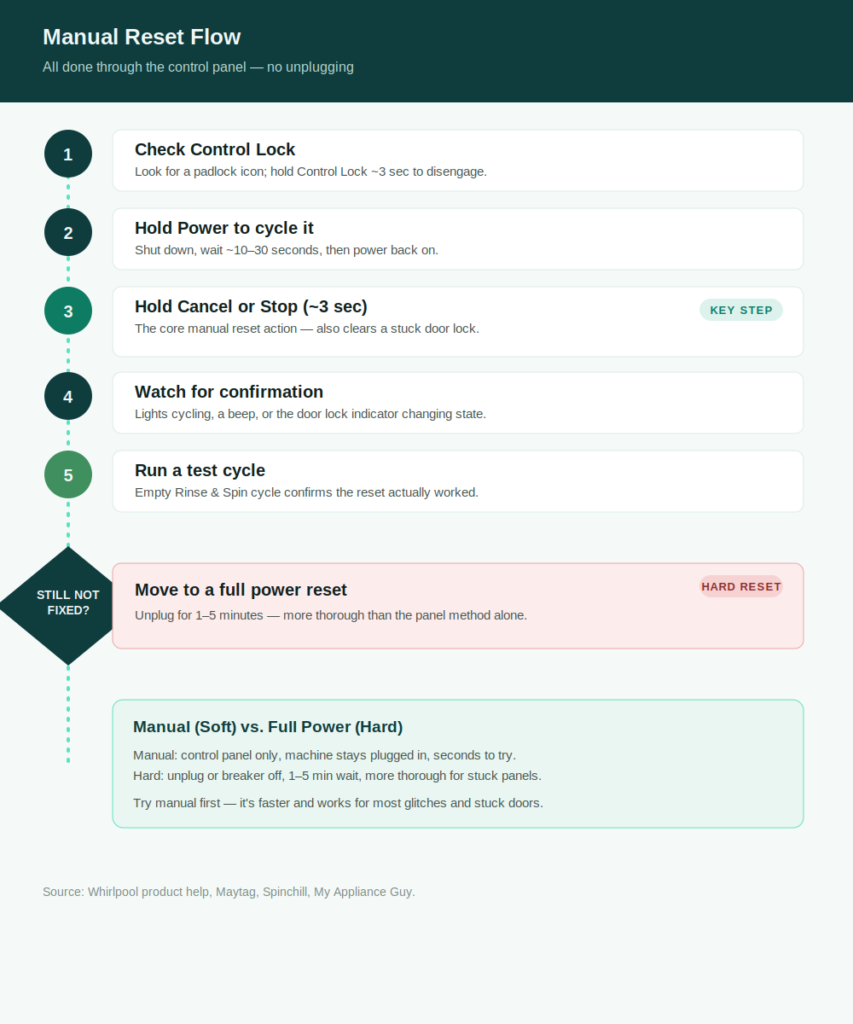
- Check for Control Lock first. Look for a padlock or key icon on the display. If it’s active, press and hold the Control Lock button (commonly 3 seconds) to disengage it — this alone resolves a good share of “unresponsive panel” complaints.
- Press and hold the Power button for a few seconds to shut the washer down completely.
- Wait about 10–30 seconds, then press Power again to turn it back on.
- If the issue persists, press and hold the Cancel or Stop button for about 3 seconds while the machine is on. This is the core manual reset action on most modern washers.
- Watch the display — you should see lights cycle, hear a beep, or see the door lock indicator change state, confirming the reset took effect.
- Select a simple test cycle (Rinse & Spin with an empty drum works well) and confirm the panel responds normally and no error code reappears immediately.
Special Case: Door or Lid Stuck Locked
This is one of the most common reasons people search for a manual reset, and it has a slightly different sequence:
- Confirm the machine is plugged in and has power.
- Press and hold the Cancel or Stop button for about 3 seconds.
- Watch the door lock indicator light — it should turn off, signaling the door has unlocked.
- Try opening the door.
- If it’s still locked, move to the full power reset: unplug the machine (or switch off the breaker) for 1 to 5 minutes, then restore power and try the door again.
If the door unlocks but then locks again on its own, or the machine still thinks there’s water in the tub, check for standing water first — some models won’t release the door lock until they detect the tub has drained.
Brand-Specific Manual Reset Notes
The core sequence above works across most modern washers, with a few brand-specific quirks worth knowing:
- Whirlpool: Confirm Control Lock isn’t engaged, then hold Power to shut down, wait, and power back on. For a stuck door specifically, hold Cancel or Stop for about 3 seconds.
- Maytag: Similar Power-cycle approach; some touchscreen models also offer a menu-based factory reset (Info → Restore Factory) as an alternative to a button-hold reset.
- Samsung: Samsung washers generally don’t have a dedicated manual reset button on the panel — the power-cycle (hard reset) method is the primary supported approach on most models.
- LG: Some models support holding Power and Start/Pause together as a manual reset; others rely primarily on the full power-cycle method.
Because this varies meaningfully by brand and even by model generation, check your owner’s manual if the general steps above don’t apply cleanly to your control panel layout.
Where to Find Your Owner’s Manual
Your model number, usually on a sticker inside the door frame or on the back panel, determines exactly which buttons your control panel uses for a manual reset and whether your model supports one at all. Manufacturer support sites host manuals by model number, which is the most reliable way to confirm your exact machine’s button layout rather than assuming every model in a brand’s lineup behaves the same way.
DIY Tutorial: The Full Manual Reset Sequence
Here’s the complete process combining every step above into one sequence, start to finish:
- Check the display for a Control Lock icon; disengage it if present by holding the Control Lock button for about 3 seconds.
- Press and hold Power for a few seconds to shut the washer down.
- Wait roughly 10–30 seconds.
- Press Power again to restart the machine.
- If the panel or error code persists, press and hold Cancel or Stop for about 3 seconds.
- Confirm the display responds — lights cycling, a beep, or a change in the door lock indicator.
- If you were dealing with a stuck door, test it now.
- Run a short empty test cycle to confirm normal operation before washing a real load.
- If none of this resolves it, move to the full power reset covered in How to Reset a Washing Machine.
If a Manual Reset Doesn’t Work
A manual reset clears software-level glitches, but it can’t fix an actual physical problem. If the same symptom returns immediately after a successful-seeming reset:
- Match the specific symptom to its likely cause rather than repeating the reset — our 15 Common Washing Machine Problems guide covers the most frequent issues and what usually causes each one, and The Complete Washing Machine Troubleshooting Guide has the full symptom-to-cause breakdown across every common issue.
- A full power reset (unplugging for several minutes) is more thorough than the panel-based method and worth trying next if you haven’t already.
- Repeated resets that don’t hold are a sign of an actual hardware fault rather than a temporary glitch, and usually point toward needing a technician.
Warranty Considerations
A manual reset through the control panel is standard, manufacturer-documented troubleshooting and never affects warranty coverage on any brand — it’s functionally the same as restarting any other consumer electronics device. It only becomes a warranty consideration if you move on to physical repairs or component-level work, which is a separate step entirely from resetting the machine.
FAQs
What’s the difference between a manual reset and just unplugging the washer?
A manual reset happens entirely through the control panel while the machine stays powered, typically by holding a button like Power or Cancel/Stop. Unplugging is a separate, more thorough method that cuts power completely and requires a longer wait before restoring it.
Can I manually reset my washer if the panel shows nothing at all?
No. A manual reset relies on the control board responding to button presses, which requires some power reaching the display. A completely dead panel points to a power supply issue rather than something a manual reset can fix.
Will a manual reset unlock a stuck door?
Often, yes. Holding the Cancel or Stop button for about 3 seconds is specifically documented by several manufacturers as a fix for a door stuck in the locked position, especially when the control panel itself is otherwise responsive.
Do all washing machines support a manual reset?
Not universally. Some brands, notably many Samsung models, don’t have a dedicated manual reset button and rely primarily on the full power-cycle method instead. Check your owner’s manual to confirm what your specific model supports.
How long should I hold the reset button?
Most manufacturer instructions specify about 3 seconds for a Cancel/Stop-based reset, though Power-button holds are sometimes described more generally as “a few seconds.” If nothing happens after 3–5 seconds, you’re likely holding the wrong button for your model.
Is it safe to try a manual reset even if I’m not sure it will work?
Yes. Since the machine stays plugged in and you’re only using buttons built into the control panel, there’s no real risk in trying it — worst case, nothing happens and you move on to the full power reset instead.
Conclusion & Next Steps
A manual reset through the control panel is the fastest thing to try when your washer’s panel freezes, an error code won’t clear, or the door seems stuck — no need to reach behind the machine or find the breaker box first. Check Control Lock, hold Power to cycle it, and if that’s not enough, hold Cancel or Stop for about 3 seconds. It resolves a genuine share of “broken” washers that were really just stuck in a glitch, in under a minute.
If the manual reset doesn’t hold and the same issue keeps coming back, the full power-cycle method is more thorough and worth trying next — see How to Reset a Washing Machine for the complete walkthrough with brand-specific confirmation steps. And if you’re seeing a symptom that a reset just won’t fix, our 15 Common Washing Machine Problems guide can help you figure out what’s actually going on.