
Table of Contents
- What Does the dE / dE2 Error Mean?
- Symptoms of a Samsung dE / dE2 Error
- What Causes the dE / dE2 Error
- Safety Warnings
- Related Samsung Washer Error Codes
- Where to Find Your Manual
- Step-by-Step Troubleshooting
- Replacement Parts You May Need
- Specs & Compatible Models
- Warranty Considerations
- Maintenance Tips to Prevent dE / dE2 Errors
- DIY Tutorial: Testing & Replacing the Door Lock Assembly
- FAQs
A Samsung washer flashing dE or dE2 mid-cycle, or refusing to start at all, is one of the most common calls appliance techs get — and one of the easier ones to diagnose yourself before booking a service visit.
Show Image
What Does the dE / dE2 Error Mean?
The Samsung washer dE / dE2 error means “Door Error” — <cite index=”34-1″>the control board cannot confirm that the door is fully closed and locked</cite>, so it won’t start or continue the cycle. dE2 specifically points to the main door lock/unlock switch not reporting correctly. In most cases this is a closing, alignment, or worn-latch issue rather than a serious electrical fault.
Why This Error Exists
Front-load washers spin the drum at high speed during the spin cycle, and <cite index=”33-1″>the door latch is a physical lock, not just a sensor — it prevents the door from flying open during a high-RPM spin.</cite> <cite index=”33-1″>The latch has two jobs: physically holding the door shut, and closing an electrical circuit that tells the control board the door is locked.</cite> The dE/dE2 code fires when that electrical confirmation fails, whether or not the door is actually secure — which is why <cite index=”33-1″>a door can be physically closed and latched while the internal microswitch has still failed.</cite>
Symptoms of a Samsung dE / dE2 Error
- “dE” or “dE2” on the display, sometimes shown as “dC” or simply “Door” depending on model
- Error appears right when you press Start, or shortly after
- <cite index=”32-1″>The door won’t lock, or locks and then immediately unlocks again</cite>
- <cite index=”32-1″>Repeated clicking sounds</cite> coming from the door lock area
- Cycle stops early — before filling, or partway through
- Door remains locked after the cycle ends and won’t release
- Error returns immediately after a reset, or only intermittently
What Causes the dE / dE2 Error
| Cause | How Common | What’s Happening |
|---|---|---|
| Door not fully closed | Very common | <cite index=”29-1″>Even a slightly open door can trigger the error</cite> |
| Debris or laundry caught in the door seal | Very common | <cite index=”27-1″>Laundry caught in the door prevents it from locking</cite> |
| Worn or damaged latch hook | Common | The plastic hook that engages the switch wears down over years of use |
| Failed door lock switch/solenoid | Common on older units | <cite index=”39-1″>The electromechanical striker wears out, the housing cracks, or contacts corrode over roughly 5–8 years</cite> |
| Loose or corroded wiring harness | Occasional | <cite index=”35-1″>The wiring harness connecting the lock to the control board works loose over time</cite> |
| Misaligned door or sagging hinges | Occasional | Causes intermittent contact even when the door appears shut |
| Control board relay fault | Rare | The board itself sends the wrong voltage to a good lock assembly |
Safety Warnings
Read this before attempting any bypass or repair.
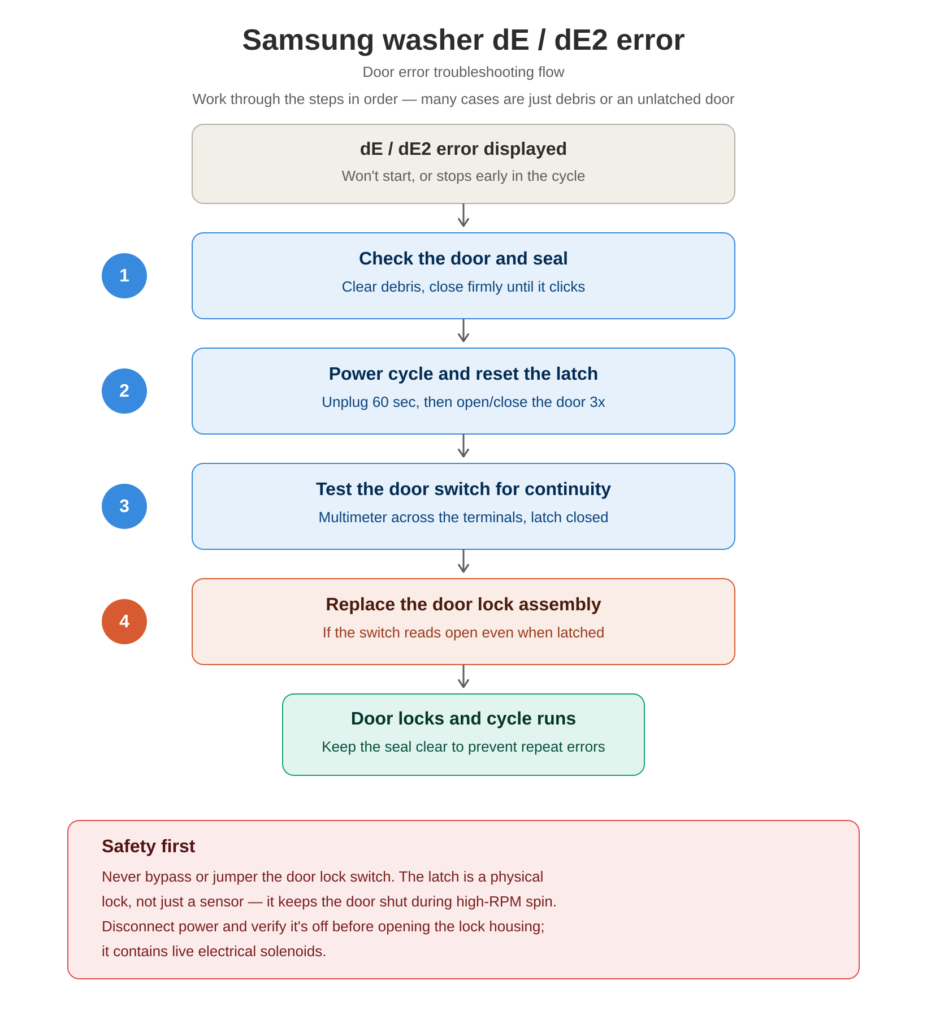
- Never bypass or jumper the door lock switch. <cite index=”33-1″>These machines spin at 1200 RPM or higher, and the door latch is what prevents the door from flying open during a spin cycle — a door opening at that speed can cause serious injury and will flood the room.</cite> There’s no safe workaround; the part must be repaired or replaced.
- <cite index=”42-1″>The door lock assembly contains electrical solenoids — always disconnect power and verify it’s off with a non-contact voltage tester before opening it.</cite>
- If the door won’t release after a cycle, <cite index=”38-1″>most models have a manual emergency release — check your manual for the tab or release slot before forcing anything.</cite>
- Don’t force a stuck door. <cite index=”19-1″>Forcing it can misalign the hinges or damage the latch strike</cite> and turn a simple fix into a bigger repair.
Related Samsung Washer Error Codes
- dE1 — <cite index=”29-1″>Also a door issue, typically pointing to the main door lock/unlock switch specifically.</cite>
- DC / dC — <cite index=”34-1″>On many models, DC and dE indicate the same thing: the door is detected as open.</cite>
- 1dC4 — <cite index=”28-1″>A FlexWash-specific code caused by a missing rubber button near the upper washer’s latch</cite> — a simple part swap, not a full lock replacement.
- UE / Ub / U6 — Load balance errors, unrelated to the door but easily confused with dE since both stop a cycle early.
[Internal link: Samsung Washer UE Error — Unbalanced Load Guide]
Where to Find Your Manual
- Check the inner door frame or the edge of the washer door opening for a printed model/serial sticker.
- On some models, the sticker is on the side or rear panel — you may need to pull the washer out slightly.
- Samsung washer model numbers typically start with WF (front-load) or WA (top-load), e.g. WF42H5200AP.
- Search that exact model number on Samsung’s official support site for the downloadable manual and full error code table.
- [Internal link: How to Find Your Samsung Washer Model Number]
Step-by-Step Troubleshooting
1. Check the Door and Seal First
Open the door and check for anything caught in the latch or door boot seal — a sock, a strap, or a bit of detergent buildup is enough to trigger the code. <cite index=”29-1″>Push the door firmly until you hear a distinct click, and check for debris in the seal or hinge that might hinder proper closure.</cite>
2. Power Cycle Reset
<cite index=”34-1″>Unplug the washer or switch off the breaker for about 60 seconds</cite>, then restore power. <cite index=”41-1″>Keep in mind a reset only clears the error log — it doesn’t fix an underlying hardware fault, so if dE returns within the next cycle or two, you’re dealing with a real problem, not a glitch.</cite>
3. Mechanically Reset the Latch
<cite index=”33-1″>With the washer unplugged, open and firmly close the door three times to mechanically reset the latch position</cite> before powering back on.
4. Rule Out Child Lock
<cite index=”39-1″>Samsung washers have a child lock feature that disables the door lock entirely if the button combination was pressed and held</cite> (often Temp + Options, varies by model) — check your control panel for a lock icon before assuming a hardware fault.
5. Test the Switch for Continuity (Advanced)
<cite index=”41-1″>Set a multimeter to continuity, manually click the latch shut, and test the switch terminals</cite> — a reading of “open” even when the latch is clicked shut confirms the switch has failed and the assembly needs replacing. <cite index=”41-1″>If the switch tests fine, check the wire harness for a broken or corroded connection instead.</cite>
6. Replace the Door Lock Assembly
If the latch physically engages but the error persists, or the switch fails continuity testing, the door lock/latch assembly itself needs replacing — this resolves the large majority of persistent dE/dE2 cases.
Replacement Parts You May Need
| Part | What It Does | Notes |
|---|---|---|
| Door lock/latch assembly | Physically locks the door and reports lock status electrically | Most common fix; Samsung part numbers vary by model — <cite index=”42-1″>DC64-01538A covers many WF-series models from 2012 onward</cite> |
| Wiring harness/connector | Carries the lock signal to the control board | Often just needs reseating or cleaning, not replacement |
| Control board | Processes the door lock signal | Replace only if the lock assembly tests good but the error persists |
Confirm the exact part number for your model before ordering — <cite index=”38-1″>Samsung has used several door lock part numbers across model years, including DC64-00519B, DC64-00519D, and DC64-01538A.</cite> <cite index=”39-1″>The part itself typically costs $25–$40, while professional installation including the part runs roughly $150–$250.</cite> [Internal link: Samsung Washer Parts Buying Guide]
Specs & Compatible Models
This dE/dE2 pattern is documented across most Samsung front-load washer families, including WF42H5200AP, WF45xxx/WF50xxx series, and FlexWash models (also prone to the related 1dC4 code). Some newer models display “Door” in plain text instead of a dE code — treat it identically. Confirm your specific model’s code table in the manual, since a handful of models use dC as the primary door-error label rather than dE.
Warranty Considerations
- Most Samsung washers carry a 1-year manufacturer’s warranty on parts and labor.
- Door lock assemblies on some models carry extended component coverage beyond the base warranty — check your specific model’s warranty card or Samsung’s support site.
- If you purchased an extended protection plan, a door lock failure is typically a covered mechanical/electrical failure — confirm whether “wear item” exclusions apply, since some plans treat latch components as consumables.
- Opening the front panel to test or replace the lock yourself may void remaining warranty coverage — request a technician visit if your unit is still covered.
Maintenance Tips to Prevent dE / dE2 Errors
- Wipe down the door seal after heavy loads to clear detergent residue and lint.
- Avoid overloading the drum — <cite index=”32-1″>overstuffing can pull the door slightly out of alignment and prevent a clean lock.</cite>
- Close the door firmly every time until you hear the latch click.
- Periodically check the door boot seal fold for trapped socks or small items.
- Don’t leave wet laundry sitting in the machine, which encourages grime buildup near the latch.
DIY Tutorial: Testing & Replacing the Door Lock Assembly
Tools needed: Phillips #2 screwdriver, needle-nose pliers, putty knife, multimeter (for testing), non-contact voltage tester, replacement door lock assembly
- Unplug the washer and confirm no residual power with a non-contact voltage tester.
- <cite index=”37-1″>Locate the door boot seal running along the outer rim of the door opening</cite> — most models allow lock access through this opening without removing the full front panel.
- Pull back the boot seal retaining spring with needle-nose pliers to access the lock housing, or remove the front panel if your model requires full access.
- <cite index=”42-1″>Disconnect the wiring harness by pressing the release tab and pulling apart, noting the wire orientation first.</cite>
- Test the old switch for continuity with the door manually latched, if you haven’t already, to confirm the assembly is the actual fault.
- Remove the mounting screws on the old door lock assembly and lift it out.
- Install the new assembly, reconnect the harness in the same orientation, and reseat the boot seal spring fully.
- Restore power and test a short cycle, confirming the door locks with an audible click and the error doesn’t return.
If the replacement lock also fails immediately, or the error persists after a confirmed-good part, the fault is likely upstream — the control board’s lock relay or the wiring harness — and this level of diagnosis is best handled by a technician.
FAQs
Can I run my Samsung washer with a broken door lock by bypassing the switch?
No. The door latch is a physical safety lock that keeps the door shut during a high-speed spin cycle, not just a sensor. Bypassing it risks the door opening mid-spin, which can cause serious injury and will flood the room. The part must be repaired or replaced — there’s no safe workaround.
Why does my Samsung washer show dE even though the door looks closed?
The latch has two separate jobs: physically holding the door shut and electrically confirming that lock to the control board. A door can be physically closed while the internal microswitch has failed, so a visually closed door doesn’t rule out a hardware fault.
Does resetting my Samsung washer fix the dE error permanently?
Sometimes, if the cause was debris, an unlatched door, or a one-time glitch. A reset only clears the stored error, though — it doesn’t repair a worn latch or failed switch, so if the code returns within a cycle or two, you’re dealing with a real hardware issue.
How much does it cost to fix a Samsung washer dE error?
A replacement door lock assembly part typically costs $25–$40. Professional installation including the part generally runs $150–$250, though the repair is straightforward enough for a confident DIYer to handle in about 20–30 minutes.
Is dE the same as dE1 or dE2 on a Samsung washer?
They’re closely related. All three indicate a door detection or lock issue; dE1 and dE2 point more specifically toward the main door lock/unlock switch not reporting correctly, while dE (and DC on some models) is the general “door not detected as closed and locked” code.
What’s the Samsung washer child lock, and could it be causing my dE error?
Child lock is a feature that, when enabled, can disable the door lock function entirely. If the button combination was accidentally pressed and held, the door won’t lock and a door-related error can appear even though nothing is actually broken — check your control panel for a lock indicator before assuming a hardware fault.
How do I get my clothes out if the door is locked and won’t open?
Most Samsung washers have a manual emergency release, often a tab or a slot near the door lock for a thin tool — check your specific model’s manual before forcing the door, since forcing it can damage the latch strike or hinges.
Conclusion
A dE or dE2 code is your washer’s way of saying it can’t confirm the door is safely locked — and most of the time that’s debris in the seal, an unlatched door, or a worn latch, not a control-board failure. Check the seal, reset the latch, and test the switch before you assume you need a full lock assembly, and never bypass the switch to force a cycle through.
Want more verified appliance fixes like this one? TechSolved publishes real, technician-checked troubleshooting guides — no guesswork, no recycled forum posts. Browse the full library at www.techsolved.blog, or check out these related Samsung repair guides: