
What the OE error means
The OE error code on an LG washing machine means the washer’s sensors have detected that it’s unable to drain the water used during the wash cycle. It’s not a random glitch — it’s a built-in safety stop that pauses the cycle before water can overflow or damage internal components, and it almost always points to something physically blocking the drain path rather than a failed control board.
Symptoms of the OE error
Before the code even appears on the display, most LG owners notice a pattern:
- The washer pauses mid-cycle, usually during or right after the rinse/spin stage, rather than at the very start.
- The drum still has standing water in it when the cycle stops.
- The display shows “OE” and the machine won’t proceed to spin.
- In some cases, the washer will attempt to time itself out and begin draining on its own after roughly 8–10 minutes, temporarily clearing the code — only for it to return on the next wash.
- On some models, you may hear the drain pump humming without any water actually leaving the tub, which points toward a blockage rather than a dead pump.
What causes the OE error
Kinked or improperly installed drain hose. A kinked drain hose is one of the two most common causes of this code. This tends to happen when the washer is pushed too close to a wall, or when the hose was routed incorrectly during installation — a common issue on newly installed units.
Clogged drain pump filter (coin trap). The other leading cause. LG front-load washers have a debris filter, often called the coin trap, behind a small access door on the lower front panel, and coins, hairpins, buttons, and fabric fragments collect there and restrict the drain until the machine can no longer clear water fast enough.
Blocked or slow household drain standpipe. If the hose and filter are both clear, the problem may be downstream — a partially clogged standpipe in your home’s plumbing can prevent the washer from discharging water quickly enough, triggering the same code even though nothing inside the machine has failed.
Failing drain pump. A badly clogged coin trap can jam the pump impeller outright, imitating a failed pump — which is why cleaning the filter first is critical before assuming the pump itself needs replacing. A pump that has ingested a hard object often survives with a cleaned impeller, but one that has run dry against a jam long enough to overheat the winding will need replacing regardless.
Water level or pressure sensor fault. Less common, but on some units a degraded pressure switch or a misaligned sensor hose can send inaccurate readings to the control board, triggering an OE error even when drainage itself is working normally.
Safety first
- Unplug the washer before opening any access panel or touching the pump, hose, or filter — turn off the water supply to the washer as well.
- Keep a shallow pan and towels ready before opening the filter access door — the tub may still hold several liters of water that will spill out immediately.
- Don’t force a stuck filter cap; if it won’t turn, stop and check for obstruction rather than applying excess force, which can crack the housing.
- If the pump hums but produces no water flow after a clean filter, or if you notice a burning smell, stop and call a professional rather than continuing to test the unit.
Related LG error codes
OE rarely appears in isolation — it’s worth knowing its neighbors, since some troubleshooting paths overlap:
| Code | Meaning |
|---|---|
| OE | Draining problem — water isn’t leaving the drum |
| IE | Water is not being supplied to the washer or water pressure is too low |
| dE | The washer lid or door is not closed properly |
| UE | Load is unbalanced |
| FF | The unit is frozen — check the water inlet and drain hoses |
| PF | A power failure interrupted the cycle |
For a deeper look at the unbalanced-load code specifically, see [Internal link: LG Washing Machine UE Error].
Manuals and manufacturer resources
LG’s official support library maintains the current error code list and step-by-step video guides for most front-load models, including the exact filter access panel location for your machine. Have your model number ready (found on a sticker inside the door frame) before searching LG’s support site, since access panel position and filter design vary slightly across model years.
Step-by-step troubleshooting
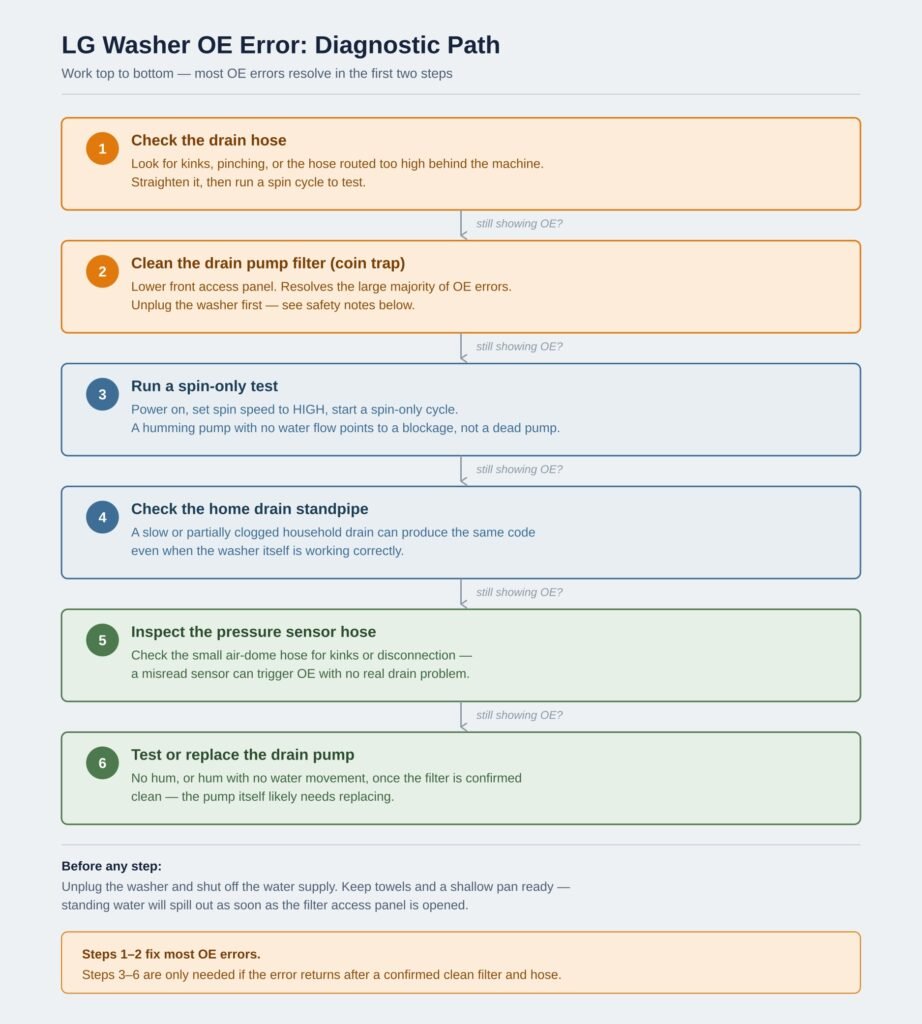
- Check the drain hose first. Pull the washer out slightly and inspect the hose for kinks, pinching, or improper height. Straighten any kinks, then run a spin cycle to confirm whether the OE error has resolved.
- Run a spin-only test. Press POWER to turn the washer on, select SPIN SPEED until HIGH is selected, then press START/PAUSE to begin a spin-only cycle — a humming sound confirms the drain pump motor is at least attempting to run.
- Clean the drain pump filter. This resolves the majority of OE errors. Full walkthrough in the DIY section below, or see [Internal link: How to Clean a Washing Machine Drain Filter].
- Check your home’s standpipe. If the hose and filter are clear, confirm the drain standpipe itself isn’t backed up — a plumbing snake or a call to a plumber may be needed if water backs up into the washer’s drain area.
- Inspect the pressure sensor hose. If OE persists after a confirmed clean drain, check the small sensor hose (sometimes called the air dome hose) for kinks or disconnection.
- Test or replace the drain pump. If the pump doesn’t hum during the spin-only test, or hums without moving water once the filter is confirmed clear, the pump itself likely needs replacement — see [Internal link: How to Replace a Washing Machine Drain Pump].
- Reset the washer. After any fix, unplug the washer for a few minutes, then reconnect and try a short cycle to clear the stored error. Full reset steps: [Internal link: How to Reset a Washing Machine].
Replacement parts you might need
- Drain pump filter / coin trap assembly — inexpensive and the first part to inspect; often only needs cleaning, not replacing.
- Drain pump — needed if the pump has failed mechanically or burned out its winding after running dry against a jam.
- Drain hose — replace if cracked, collapsed, or kinked beyond repair, particularly on older installations.
- Pressure/water-level sensor and sensor hose — a less common but valid replacement if sensor readings are confirmed faulty rather than the drain path itself.
Always confirm the exact part number against your specific model before ordering — LG uses similar-looking pumps across several washer and even dishwasher lines, and a mismatched part won’t seat or seal correctly.
Specs: which LG models this affects
The OE error code applies broadly across LG’s front-load washer and washer-dryer combo lineup, since the drain pump filter is a front-load-specific component and is not present on LG top-load washers. Top-load LG models use a different drain and error-code architecture, so if you own a top-loader and see unusual drain behavior, confirm your model’s actual error code against LG’s top-load-specific list rather than assuming OE applies the same way.
Warranty considerations
Cleaning the drain pump filter and inspecting the drain hose are considered routine homeowner maintenance and won’t affect your warranty. However, opening the washer to access or replace the drain pump itself, the control board, or internal wiring may void remaining warranty coverage on some LG models if performed by anyone other than an authorized technician. Check your specific warranty terms — typically included with your owner’s manual or available through LG’s support site with your model and serial number — before attempting a pump replacement on a machine still under warranty.
Maintenance to prevent OE errors
- Clean the drain pump filter monthly. LG recommends cleaning out the drain pump filter of any lost items and lint buildup on a monthly basis — the single most effective habit for avoiding OE errors long-term.
- Check pockets before every wash. Coins, hairpins, and small items are the most common filter-clogging culprits.
- Don’t overload the washer. Sticking to the recommended load capacity prevents undue strain on the drain pump and reduces lint and fabric fragments reaching the filter.
- Use the correct amount of HE detergent. Overdoing detergent or fabric softener can lead to excessive suds that overflow the drain trap and cause clogs.
- Leave adequate clearance behind the washer when installing or repositioning it, so the drain hose can’t become kinked against the wall.
DIY tutorial: cleaning the drain pump filter
This is the fix that resolves the large majority of LG OE errors, and it takes about 15–20 minutes.
- Make sure the unit is empty, powered off, unplugged, and drained of any visible water in the tub.
- Set a shallow pan and a few towels on the floor in front of the access panel — water will come out as soon as the filter is opened.
- Open the access panel on the lower front of the washer, usually by pulling a tab downward and out (position varies slightly by model — some have it on the right side of the service cover instead of the left).
- Pull the drain hose into the pan and remove its plug, allowing standing water to drain completely before touching the filter itself.
- Unscrew the filter cap slowly and completely, then pull the filter straight out.
- Remove all debris — lint, coins, hairpins, buttons — and rinse the filter under running water, using a soft brush on both sides if needed.
- Inspect the impeller cavity behind the filter opening for any lodged objects before reinserting anything.
- Reinsert the filter and turn it clockwise until it stops, ensuring it’s fully seated and sealed.
- Replace the drain hose plug, close the access panel, and tighten any screws or the panel latch.
- Plug the washer back in, restore the water supply, and run a short or spin-only cycle to confirm the OE error is gone.
Frequently Asked Questions
Why does my LG washer keep showing OE even after I cleaned the filter?
If OE returns after a confirmed clean filter and straight hose, check the drain standpipe in your home’s plumbing and the pressure sensor hose next — the filter resolves most cases, but a downstream plumbing clog or a sensor fault can produce the identical code.
Is it safe to keep using my washer if it shows OE occasionally?
It’s best not to. The code exists specifically to stop the cycle before water overflows or damages the machine, so repeated OE errors should be resolved rather than worked around, even if the washer occasionally clears itself after timing out.
How often should I clean my LG washer’s drain pump filter?
LG recommends cleaning it monthly, though households with kids, pets, or frequent use of tissues and small items in pockets may need to check it more often.
Does the OE error mean my drain pump is broken?
Not necessarily, and often not at all — a clogged filter can jam the pump and mimic pump failure. Clean the filter first and run a spin-only test; only consider the pump itself faulty if it doesn’t hum or moves no water once the filter is confirmed clear.
Why did OE appear right after I had my LG washer installed?
New installations are a common trigger, usually because the drain hose was routed incorrectly or kinked during setup. Check the hose path and height behind the machine before assuming a mechanical fault.
Can a clogged drain hose cause the same symptoms as a bad pump?
Yes — a kinked or clogged hose is one of the two leading causes of OE and produces identical symptoms to a failing pump, which is exactly why hose and filter checks come before any parts replacement.
Will resetting my LG washer clear a persistent OE error?
A power reset (unplugging for a few minutes) can clear the stored error code, but if the underlying blockage hasn’t been fixed, OE will simply return on the next cycle that needs to drain.