
Table of Contents
- How Do You Reset a Washing Machine? (Quick Answer)
- Signs Your Washer Needs a Reset
- Why a Reset Fixes So Many Washer Problems
- Safety Precautions Before You Reset
- The Universal Reset Method (Works on Almost Any Washer)
- Brand-Specific Reset Instructions
- Where to Find Your Owner’s Manual
- DIY Tutorial: Step-by-Step Full Reset
- If a Reset Doesn’t Fix It: What’s Next
- Reset Timing Specs by Brand
- Warranty Considerations
- How Often Is It Safe to Reset a Washer?
- FAQs
- Conclusion & Next Steps
To reset most washing machines, unplug the machine (or switch off its breaker) and wait one to five minutes to let the control board fully discharge, then plug it back in and start a new cycle. Most washers don’t have a dedicated reset button — unplugging is the reset. Some brands add an extra step, like opening and closing a top-loader’s lid six times within 12 seconds, or holding Power + Start/Pause on a front-loader for about five seconds.
Signs Your Washer Needs a Reset
A reset is worth trying whenever your washer is acting up in ways that don’t look like a physical clog or leak:
- The machine is completely unresponsive — no lights, no beeps, nothing happens when you press Start.
- It’s frozen mid-cycle, stuck on the same step with no progress.
- An error code is displayed but the underlying cause (drain, fill, balance) doesn’t seem to actually be present.
- The control lock feature engaged unexpectedly and won’t release.
- The washer behaved oddly after a power surge, outage, or brief power interruption.
- It’s stuck in a diagnostic or test mode it shouldn’t be in.
Why a Reset Fixes So Many Washer Problems
A washing machine’s control board is a small computer, and like any computer, it can get stuck in a bad state without anything actually being broken. A reset works by fully cutting power long enough for the board’s capacitors to discharge completely, clearing whatever glitch, corrupted state, or sensor misread was causing the machine to misbehave — the appliance equivalent of rebooting a frozen laptop rather than replacing a part.
Safety Precautions Before You Reset
- Always unplug the washer, don’t just turn off the wash cycle. A reset requires actually cutting power, not just pressing a button on the panel.
- If your washer is hardwired instead of plugged in, switch off the dedicated breaker instead of trying to access a cord.
- Don’t rush the wait time. Cutting the wait short is the most common reason a reset appears not to work — the control board needs the full window to discharge.
- Keep hands dry when handling the plug or breaker, especially if there’s been a leak or standing water nearby.
The Universal Reset Method (Works on Almost Any Washer)
This is the master method that works across nearly every brand and model, and it’s worth trying first regardless of what’s wrong:
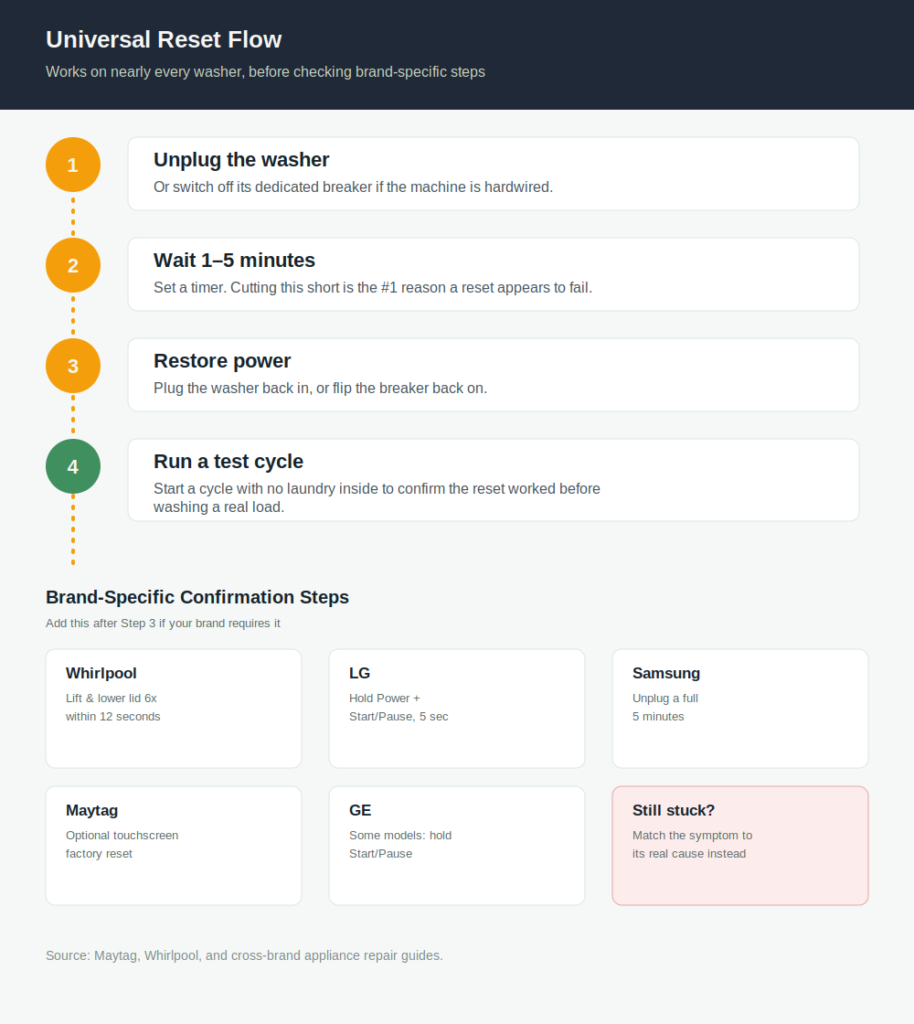
- Unplug the washer from the wall outlet, or switch off its dedicated circuit breaker if it’s hardwired.
- Wait at least one full minute — some models benefit from waiting up to five minutes to fully discharge the control board.
- Plug the washer back in, or restore the breaker.
- Start a new cycle to confirm the reset worked.
If this doesn’t resolve things, move on to your brand’s specific method below — some machines need an extra confirmation step beyond a simple power cycle.
Brand-Specific Reset Instructions
While the universal method above resolves most issues, these brand-specific variations add a confirmation step some models require:
- Whirlpool: Unplug for 60 seconds (don’t shortcut this), plug back in, then lift and lower the lid six times within about 12 seconds on top-load models.
- LG: With the washer unplugged, press and hold Power and Start/Pause together for about 5 seconds, then release and plug back in.
- Samsung: Turn off power for a full 5 minutes (longer than most brands) before restarting the machine.
- Maytag: Unplug and wait a few minutes; some newer front-load touchscreen models also offer a factory reset through Info → Restore Factory in the settings menu.
- GE: Unplug for at least 1 minute; some models respond to holding Start/Pause for several seconds while powered.
Always check your specific model’s manual if these don’t apply — reset sequences can vary even within a single brand’s lineup, especially between older mechanical-dial models and newer touchscreen models.
Where to Find Your Owner’s Manual
Your model number (usually on a sticker inside the door frame or on the back panel) determines whether your washer has a dedicated reset button, a touchscreen factory-reset option, or only the standard unplug method. Manufacturer support sites host manuals by model number and are the most reliable source for reset instructions specific to your exact machine, since features vary even between similar-looking models in the same product line.
DIY Tutorial: Step-by-Step Full Reset
Here’s the complete process combining the universal method with the most common confirmation steps, start to finish:
- Cancel or stop any active cycle first, if possible.
- Unplug the washer from the wall, or switch off its breaker.
- Wait a full 1 to 5 minutes — set a timer rather than guessing, since underestimating this step is the most common reason a reset seems to fail.
- While unplugged, open and close the door or lid a few times; this is a required step on several brands and harmless on the rest.
- Plug the washer back in, or restore the breaker.
- If you have a top-load washer, open and close the lid six times within about 12 seconds of restoring power — this specific sequence signals the control board to complete the reset on Whirlpool and several other brands.
- If you have a front-load washer, and your brand requires it, hold the button combination for your brand (see above) for about 5 seconds.
- Start a new cycle, ideally without laundry inside, to confirm the reset worked before running a full wash.
If a Reset Doesn’t Fix It: What’s Next
A reset clears software-level glitches, but it won’t fix a physical problem — a genuinely clogged filter, a failed pump, or a worn part will still cause the same symptom after the reset completes. If the same error or behavior returns immediately:
- Match the symptom or error code to its specific cause rather than resetting repeatedly. Our Complete Washing Machine Troubleshooting Guide has a full symptom-to-cause diagnostic table.
- If you’re getting a specific Samsung code, see our dedicated guides for Samsung Washing Machine 4E Error (water supply) or Samsung Washing Machine 5E Error (drainage) — both explain exactly what to check before assuming a part has failed.
- Repeated resets that don’t hold are a sign of an actual hardware fault, not a software glitch, and usually point toward needing a technician.
Reset Timing Specs by Brand
| Brand | Minimum Wait | Confirmation Step |
|---|---|---|
| Whirlpool | 60 seconds | Lift/lower lid 6x within 12 seconds (top-load) |
| LG | ~5 seconds (button hold) | Hold Power + Start/Pause together |
| Samsung | 5 minutes | None beyond the wait |
| Maytag | A few minutes | Optional touchscreen factory reset on select models |
| GE | 1 minute | Some models: hold Start/Pause |
| Universal fallback | 1–5 minutes | Open/close door a few times, then start a test cycle |
Warranty Considerations
A basic power-cycle reset is standard, manufacturer-endorsed troubleshooting and doesn’t affect warranty coverage on any brand. If your washer offers a touchscreen factory reset that clears saved settings or Wi-Fi pairing, that’s also safe to use — it resets software state, not hardware, so it won’t void a warranty. Only physical repairs or component-level work carry warranty risk, not a standard reset.
How Often Is It Safe to Reset a Washer?
There’s no meaningful limit on how often you can safely power-cycle a washing machine — it’s the same as restarting a router or a computer. That said, if you find yourself resetting the same machine repeatedly for the same recurring symptom, that’s a signal to diagnose the actual cause rather than keep resetting around it; frequent resets are a workaround, not a fix, for an underlying hardware issue.
FAQs
Does every washing machine have a reset button?
No. Most washing machines don’t have a dedicated reset button — unplugging the machine and waiting serves as the reset for the vast majority of models. Some newer touchscreen models do offer a software factory-reset option in their settings menu.
How long should I leave my washer unplugged to reset it?
At least one minute, though some brands, most notably Samsung, specify a full 5 minutes. When in doubt, err toward the longer wait — cutting it short is the most common reason a reset doesn’t seem to work.
Will resetting my washer clear an error code?
Often, yes, if the error was caused by a sensor glitch or a temporary state rather than an actual physical fault. If the underlying cause, like a clogged filter or a real supply issue, is still present, the code will return once you start a new cycle.
Can a reset fix a washer that won’t start at all?
Sometimes. If the machine is completely unresponsive due to a control board glitch, a full unplug-and-wait reset can restore it. If there’s no power reaching the outlet at all, that’s an electrical issue a reset won’t solve.
Is it bad to unplug a washing machine mid-cycle to reset it?
It’s generally safe, though if there’s water in the tub, you may want to run an emergency drain first rather than leaving standing water for an extended period. Interrupting a cycle to reset is a normal troubleshooting step, not something that damages the machine.
Why does my washer’s lid or door need to open and close during a reset?
On several brands, this action is how the control board confirms the reset sequence is intentional, since the same lid switch is also a core safety sensor during normal operation. It’s a built-in confirmation step, not just a quirk.
What’s the difference between a reset and a factory reset?
A standard reset clears a temporary glitch by cutting power. A factory reset, available on some newer touchscreen models, additionally clears saved settings, favorite cycles, and Wi-Fi pairing, returning the machine to its out-of-box configuration.
Conclusion & Next Steps
A washing machine reset is the single easiest thing to try before assuming you have a real repair on your hands — it costs nothing, takes a few minutes, and resolves a genuine share of “broken” washers that were really just stuck in a glitch. Start with the universal unplug-and-wait method, add your brand’s confirmation step if it needs one, and give the control board the full wait time it needs before deciding the reset didn’t work.
If a reset doesn’t hold and the same symptom keeps coming back, that’s your sign to stop resetting and start diagnosing — head to our Complete Washing Machine Troubleshooting Guide to match your exact symptom to its likely cause and the right fix.