
Table of Contents
- What Does the dE1 / dE2 Error Mean?
- Symptoms of an LG dE1 / dE2 Error
- What Causes the dE1 / dE2 Error
- Safety Warnings
- Related LG Washer Error Codes
- Where to Find Your Manual
- Step-by-Step Troubleshooting
- Replacement Parts You May Need
- Specs & Compatible Models
- Warranty Considerations
- Maintenance Tips to Prevent dE1 / dE2 Errors
- DIY Tutorial: Inspecting & Replacing the Door Lock
- FAQs
An LG washer that stops mid-cycle flashing dE1 or dE2 is refusing to run for a reason — it can’t confirm the door is actually locked, and it won’t spin a drum full of water and clothes behind a door that might come open. The good news is that both codes point to a small, well-documented set of causes you can usually work through yourself. This guide is part of the TechSolved appliance error-code library, where every fix is checked against real manufacturer and repair-technician sources before publishing.
What Does the dE1 / dE2 Error Mean?
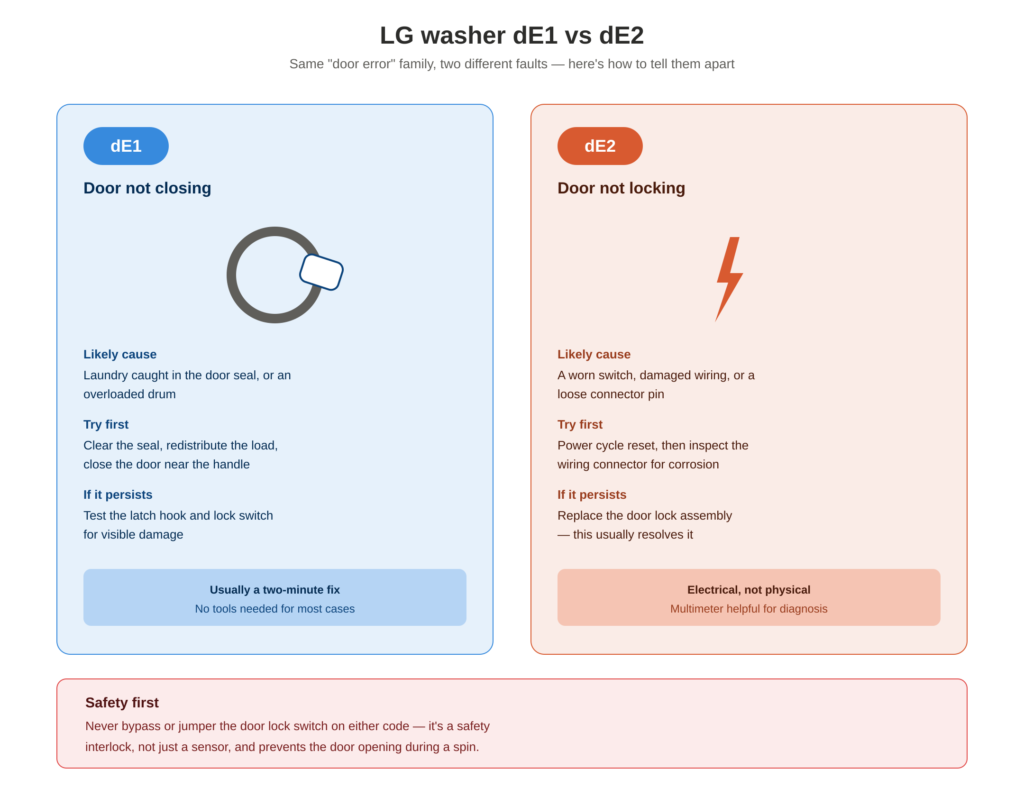
<cite index=”1-1″>A dE1 error code indicates that the door is not closed properly</cite>, most often because something is caught in the door seal. <cite index=”1-1″>A dE2 error code indicates that the door is closed but not locked</cite> — a more specific fault pointing at the lock mechanism itself rather than the door’s physical position. <cite index=”6-1″>The dE1 variant points to the lock mechanism itself, while dE2 relates to the door switch circuit.</cite>
Why the Distinction Matters
It’s tempting to treat dE1 and dE2 as interchangeable “door error” codes, but they point diagnosticians in different directions. <cite index=”7-1″>dE2 specifically points to the electrical side of the door lock — the switch or its wiring — rather than the physical latch.</cite> <cite index=”7-1″>The washer interprets a dropping-out lock signal as the door opening and closing repeatedly, a safety risk during spin, so the cycle stops immediately.</cite> That’s a meaningfully different repair path than dE1’s “something is physically blocking the door” story — one is often a two-minute fix, the other can mean a worn switch or wiring fault.
Symptoms of an LG dE1 / dE2 Error
- “dE,” “dE1,” or “dE2” on the display, usually within seconds of pressing Start
- A clicking or buzzing noise from the door area right before the code appears
- Cycle won’t begin filling at all
- On dE2 specifically, the cycle can start normally and then stop mid-spin if the lock signal drops out under vibration
- Door appears visually closed but the washer still won’t proceed
- Error returns immediately after a reset, or only shows up intermittently
What Causes the dE1 / dE2 Error
| Cause | Typically Points To | What’s Happening |
|---|---|---|
| Laundry caught in the door seal | dE1 | <cite index=”1-1″>Laundry caught between the washer door and the rubber door gasket</cite> prevents a full physical close |
| Overloaded drum | dE1 | <cite index=”4-1″>Too much laundry keeps the door-side surface uneven, so the door can’t seat flush</cite> |
| Door pressed shut incorrectly | dE1 | <cite index=”4-1″>Pressing the upper part of the door instead of the center-right handle area</cite> can leave it not fully seated |
| Worn or broken latch hook | dE1 or dE2 | <cite index=”6-1″>The plastic latch hook wears down over time or snaps off, so the strike can’t hold the door shut</cite> |
| Failed door lock switch | dE2 | <cite index=”7-1″>Switch contacts inside the lock assembly wear, pit, or corrode, sending an unstable signal to the board</cite> |
| Damaged wiring harness | dE2 | <cite index=”7-1″>A broken conductor or a connector pin that has backed out causes intermittent contact during vibration</cite> |
| Corroded connector pins | dE2 | <cite index=”7-1″>Moisture from the laundry environment corrodes the connector pins at the door lock or control board</cite> |
| Control board relay failure | dE2 | <cite index=”7-1″>A failing relay that supplies power to the door lock cycles erratically</cite> |
Safety Warnings
Read this before attempting any bypass or repair.
- Never bypass or jumper the door lock switch to force a cycle to start. <cite index=”8-1″>This is a safety interlock, and the washer correctly refuses to run until it’s genuinely fixed</cite> — a door that isn’t actually locked can open during a high-speed spin.
- Always unplug the washer before removing any panel or touching the door lock assembly or its wiring.
- Test the switch with the washer unplugged, manually holding the latch closed to simulate a locked door.
- Don’t force a door that won’t close — that risks bending the latch hook further and turning a simple fix into a full parts replacement.
Related LG Washer Error Codes
- dE3 — <cite index=”2-1″>Appears if the lid isn’t properly latched; check that the latch area is free of clothing and obstructions.</cite>
- dE (general) — <cite index=”8-1″>A broader door lock fault code that dE1 and dE2 are more specific variants of.</cite>
- IE — <cite index=”2-1″>Indicates a problem with the water supply, often clogged inlet filters</cite> — unrelated to the door but can also stop a cycle early.
- UE — Unbalanced load error; distribution issue rather than a door fault, though both interrupt the cycle similarly.
For a closely related fault on a different brand, see our guide to the Samsung washer dE / dE2 door error — same symptom family, different lock hardware.
Where to Find Your Manual
- Check the inner door frame or the edge of the door opening for the model/serial sticker.
- LG washer model numbers typically start with WM (front-load) or WT (top-load), e.g. WM3900HWA.
- Search the exact model on LG’s official support site for the downloadable manual and full error code list.
- [Internal link: How to Find Your LG Appliance Model Number]
Step-by-Step Troubleshooting
1. Clear the Door Seal First
<cite index=”6-1″>Open the door and inspect the rubber door boot seal, running your hand around the gasket to remove any clothing, lint, or debris caught between the seal and door frame.</cite> Confirm the seal sits evenly with no folds or bunching.
2. Redistribute an Overloaded Drum
<cite index=”4-1″>Rearrange the laundry so the door-side surface is even and flat</cite> before closing the door again.
3. Close the Door Correctly
<cite index=”4-1″>Press the center-right side of the door near the handle to close it, not the upper part</cite> — pressing the wrong spot is a surprisingly common cause of a false dE1.
4. Power Cycle Reset
<cite index=”1-1″>Unplug the washer or flip the breaker, then with power disabled, press and hold Start/Pause for 5 seconds</cite> before restoring power and trying again.
5. Test the Door Lock Switch (Advanced)
With the washer unplugged, manually hold the latch closed and test the switch terminals with a multimeter on continuity. A reading of “open” with the latch held closed confirms the switch has failed.
6. Inspect the Wiring Connector (dE2-focused)
<cite index=”7-1″>Unplug the washer, access the door lock area from behind the front panel, and inspect the wire harness connector’s pins for corrosion, oxidation, or burn marks.</cite> <cite index=”7-1″>Clean corroded pins with electrical contact cleaner</cite> before reconnecting.
7. Replace the Door Lock Assembly
If the switch fails continuity testing, or cleaning the wiring doesn’t resolve a persistent dE2, the door lock assembly needs replacing — this resolves most hardware-level cases.
Replacement Parts You May Need
| Part | What It Does | Notes |
|---|---|---|
| Door lock/switch assembly | Physically locks the door and reports status electrically | <cite index=”12-1″>Common OEM part number EBF61315802</cite>, though it varies by model — always confirm against your model number |
| Door lock strike | The catch the latch hooks into | <cite index=”13-1″>Sometimes sold and replaced alongside the lock switch as a kit</cite> |
| Wiring harness connector | Carries the lock signal to the control board | Often just needs cleaning, not replacing |
<cite index=”10-1″>A replacement door lock typically costs $30–$60 for the part</cite>, and <cite index=”10-1″>replacing it is a straightforward task for most DIY enthusiasts</cite> — budget extra for professional labor if you’d rather not open the front panel yourself. [Internal link: LG Washer Parts Buying Guide]
Specs & Compatible Models
This dE1/dE2 pattern is documented across most LG front-load washer families, including WM3900HWA, WM3488HW, WM4370HWA, and Kenmore-badged units on the same LG platform (796-series). Confirm your model’s error code list in the manual, since some models show a general dE code rather than the more specific dE1/dE2 split.
Warranty Considerations
- Most LG washers carry a 1-year manufacturer’s warranty on parts and labor.
- If your unit is still under warranty, <cite index=”1-1″>LG’s own support guidance directs persistent dE1/dE2 errors to a service request</cite> rather than DIY repair.
- Extended protection plans typically cover door lock failures as a mechanical/electrical fault — check for “wear item” exclusions on latch components.
- Opening the front panel yourself may void remaining warranty coverage — request a technician visit if your unit is still covered.
Maintenance Tips to Prevent dE1 / dE2 Errors
- Check the door seal for trapped items every time you load a full wash.
- Avoid overloading the drum, especially with bulky items that can wedge against the door.
- Close the door by pressing near the handle, not the top edge.
- Wipe down the door seal periodically to prevent lint and detergent buildup.
- Don’t slam the door shut — a firm, even push is more reliable than force.
DIY Tutorial: Inspecting & Replacing the Door Lock
Tools needed: Phillips screwdriver, needle-nose pliers, multimeter, electrical contact cleaner, replacement door lock assembly
- Unplug the washer before doing anything beyond a visual seal check.
- <cite index=”16-1″>Locate the door lock assembly, typically a small component near the door hinge, and note how it’s connected before disturbing anything.</cite>
- <cite index=”15-1″>Remove the door boot gasket as needed to access the switch, which sits behind the front panel.</cite>
- <cite index=”16-1″>Carefully unplug the wiring harness, then remove the screws or clips securing the lock in place.</cite>
- Test the old switch for continuity with the latch held closed, if you haven’t already, to confirm it’s the actual fault.
- <cite index=”16-1″>Secure the new lock with the same screws or clips, and reconnect the harness until it clicks securely into place.</cite>
- <cite index=”16-1″>Reattach the door panel or gasket, double-check all connections, then reassemble the washer fully.</cite>
- Restore power and test a short cycle, confirming the door locks and the code doesn’t return.
If the replacement lock also throws dE2, or the code returns after confirming clean wiring and a good part, the fault is likely the control board relay — this level of diagnosis is best handled by a technician.
FAQs
What’s the actual difference between LG’s dE1 and dE2 error codes? dE1 typically means the door isn’t closing properly — usually something physical like trapped laundry or an overloaded drum. dE2 means the door is closing but the electronic lock isn’t engaging or is dropping out, pointing more toward a worn switch, damaged wiring, or a control board issue.
Can I run my LG washer with the door lock bypassed? No. The door lock is a safety interlock, and the washer is designed to refuse operation until it’s genuinely satisfied the door is locked, since an unlocked door opening during a high-speed spin is a real safety risk. There’s no safe workaround — the underlying issue needs to be fixed.
Why does my LG washer show dE1 even though the door looks closed? The most common cause is something caught in the rubber door seal that you can’t easily see, or the door was pressed shut in the wrong spot. Run your hand around the entire gasket and make sure you’re pressing near the handle, not the top of the door, when closing it.
Does resetting my LG washer fix a dE2 error permanently? Sometimes, if the cause was a one-time glitch. A reset won’t fix a genuinely worn switch, corroded wiring, or a failing relay, though — if dE2 returns mid-cycle after a reset, you’re dealing with a real hardware fault that needs further diagnosis.
How much does it cost to fix an LG washer dE1 or dE2 error? If it’s debris in the seal or an overloaded drum, it costs nothing. A replacement door lock assembly typically runs $30–$60 for the part, and it’s a straightforward enough repair for most DIYers, though professional installation is available if you’d rather not open the front panel.
Is dE the same as dE1 or dE2 on an LG washer? They’re related. Some models display a general dE code for any door lock fault, while others split it into the more specific dE1 (door not closing) and dE2 (door closing but not locking) variants — check your model’s manual for which system yours uses.
Will cleaning the door seal fix a dE2 error, or is that only for dE1? It’s worth trying either way, since a poor seal seat can sometimes prevent the latch from fully engaging the lock switch. But if the door is verifiably closing and locking correctly and dE2 still appears, especially mid-cycle, the fault is more likely electrical — the switch, wiring, or the control board relay.
Conclusion
Most dE1 and dE2 errors trace back to something simple — trapped laundry, an overloaded drum, or a door closed at the wrong spot — and clear up without spending a dime. When it is a hardware fault, the split between dE1 (physical) and dE2 (electrical) tells you where to look first, and a door lock switch is one of the more DIY-friendly parts on the whole machine to replace. Never force the door or bypass the lock to get a cycle running; fix the actual fault instead.
Want more verified appliance fixes like this one? TechSolved publishes real, technician-checked troubleshooting guides — no guesswork, no recycled forum posts. Browse the full library at www.techsolved.blog, or check out these related repair guides:
- Samsung Microwave SE / 5E Error: Keypad Stuck
- Samsung Washer dE / dE2 Error: Door Won’t Lock
- Samsung Microwave E-2X Error: Temperature Sensor Fault